
Core Web Vitals aren’t new, but they’re still one of the most misunderstood parts of SEO. A lot of brands assume fixing them means a full site rebuild or weeks of backend work. The reality is some of the biggest improvements come from straightforward on-page adjustments you can make immediately.
If your site feels “mostly fine” but you’re still not seeing the rankings, engagement, or conversions you want, Core Web Vitals might be quietly working against you. Thankfully, you don’t need to overengineer the solution.
Let’s talk about how smart on-page changes can move the needle on Core Web Vitals—and where to focus your energy first.
What Core Web Vitals Actually Measure
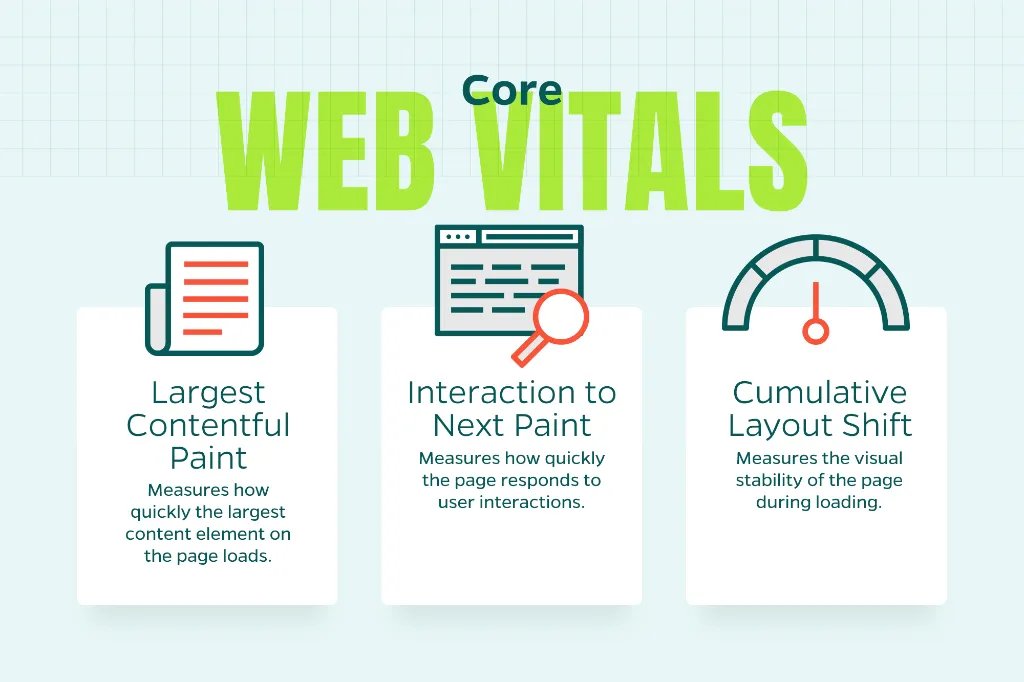
Google’s Core Web Vitals focus on real user experience through three key questions:
How fast does the main content load? (Largest Contentful Paint, or LCP)
How responsive does the page feel? (Interaction to Next Paint, or INP)
How visually stable is the page? (Cumulative Layout Shift, or CLS)
While Google uses these as ranking signals, their real value is what they tell you about usability. Sites that score well load faster, feel smoother, and frustrate users less. This shows up directly in your engagement and conversion data.
Improving LCP: Speed Starts Above the Fold
Largest Contentful Paint measures how long it takes for your most prominent element—usually a hero image or headline—to fully load. For most pages, improving LCP is about smart prioritization, not just raw speed.
On-Page Adjustments That Work
Optimize your hero images. Oversized images are LCP killers. Compress your images aggressively, use next-gen formats like WebP, and serve properly sized versions based on viewport.
Make primary content load first. Your most important elements shouldn’t compete with unnecessary scripts. Inline critical CSS and defer non-essential JavaScript so the browser can render what matters sooner.
Ditch the rotating sliders. Carousels rely on heavy scripts and multiple large images. A single, well-optimized hero image almost always performs better. It usually converts better too.
Clean up bloated templates. Extra sections, hidden elements, or unused page builder components still eat resources. Removing them can noticeably improve LCP without touching server settings.
Improving INP: Responsiveness Is a UX Issue
Interaction to Next Paint replaced First Input Delay and focuses on how quickly your page responds when users interact with it. Slow responsiveness usually means JavaScript is doing too much at once.
On-Page Adjustments That Work
Cut unnecessary JavaScript. Not every animation, widget, or tracking script earns its keep. Audit third-party tools regularly and remove anything that’s not delivering real value.
Break up long tasks. Large JavaScript tasks block the browser’s main thread and delay interactions. Splitting scripts into smaller chunks keeps things responsive.
Be selective with interactive elements. Pop-ups, chat widgets, and advanced filters are useful, but each one adds processing overhead. Use them intentionally and avoid loading them until they’re needed.
Simplify navigation and forms. Heavy dropdowns, animated menus, and overly complex forms increase interaction delay. Clean, accessible UI elements aren’t just better for INP—they’re better for users.
Improving CLS: Visual Stability Builds Trust
Cumulative Layout Shift measures how much your content moves unexpectedly while loading. If users are accidentally clicking the wrong button or losing their place while reading, CLS is probably the problem.
On-Page Adjustments That Work
Always define image and video dimensions. When browsers don’t know how much space media will take, they guess. Then, they shift everything when the asset finally loads. Explicit width and height attributes prevent this.
Reserve space for dynamic elements. Ads, banners, and embedded tools should never push content down after load. Build space for them into your layout from the start.
Be careful with font loading. Custom fonts can cause layout shifts if fallback fonts render first. Using font-display: swap carefully—and testing the visual impact—can reduce CLS issues.
Avoid late-loading banners and alerts. Cookie notices, promo bars, and announcements shouldn’t disrupt the page once users start engaging. Position them thoughtfully and load them without shifting content around.
On-Page SEO and Core Web Vitals Work Better Together
Here’s a common mistake: treating Core Web Vitals as a separate technical checklist. In reality, CWV improvements often align naturally with solid on-page SEO practices.
For example:
- Cleaner layouts improve both CLS and content readability
- Faster-loading pages improve both LCP and bounce rates
- Simplified interactions improve both INP and conversion rates
When your content, UX, and performance are aligned, the gains tend to compound.
Measuring Progress Without Overreacting
Core Web Vitals are based on real user data, which means improvements don’t show up instantly. Tools like PageSpeed Insights and Search Console are essential, but they should guide your decisions, not trigger knee-jerk reactions.
Focus on trends over time rather than chasing perfect scores. Moving a page from “poor” to “needs improvement” is often a meaningful win, especially if engagement metrics improve alongside it.
The Bottom Line
You don’t need to rebuild your website or chase every performance micro-optimization to improve Core Web Vitals. Many of the most effective fixes are right there on the page—in your layouts, content structure, and design decisions.
Focus on:
- Prioritizing above-the-fold content
- Reducing unnecessary scripts
- Stabilizing your layouts
- Designing with user interactions in mind
These adjustments deliver measurable improvements in both search visibility and actual user experience.
At the end of the day, Core Web Vitals aren’t just about pleasing Google. They’re about delivering faster, smoother, and more trustworthy experiences. That’s something every high-performing website should be working toward.
Need Help Improving Your Core Web Vitals?
If you’re not sure where to start or want expert guidance on optimizing your site’s performance, Straight North can help. Our team specializes in technical SEO and on-page optimization that drives real results. Contact us today to discuss how we can improve your Core Web Vitals and overall site performance.