

A slow, unresponsive website doesn’t just frustrate visitors—it costs you conversions and search rankings. When it comes to SEO and user experience, Google has made clear websites must prioritize performance. That’s where Core Web Vitals come in.
Google evaluates three key performance metrics known as Core Web Vitals: Largest Contentful Paint (LCP), Interaction to Next Paint (INP), and Cumulative Layout Shift (CLS). These metrics reflect how quickly your site loads, how smoothly it responds to user input, and how visually stable it remains during interaction. Since Google incorporates these signals into its search ranking algorithm, underperforming Core Web Vitals can significantly reduce your site’s visibility in search results.
Below, we’ll break down practical, real-world tips to improve each metric without drowning in technical jargon.
1. Largest Contentful Paint (LCP): Speeding Up Page Load
What it measures: How quickly the main content of your page becomes visible to users. Good score: 2.5 seconds or less.
LCP focuses on perceived load speed. That’s the moment when your visitors see your page’s primary content, whether that’s a hero image, headline, or video. If this takes too long, users may bounce before they see what you’re offering.
Optimization tips:
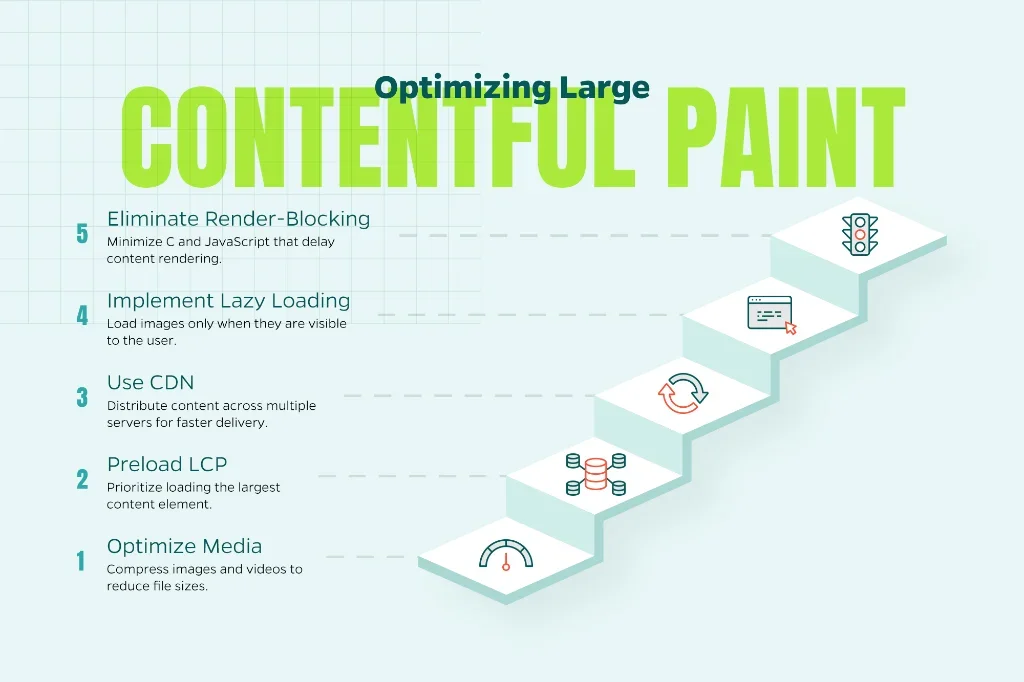
- Optimize images and video: Compress files using tools like TinyPNG or ImageOptim. You can also serve images in next-gen formats (like WebP or AVIF) and use responsive sizes so your site isn’t loading oversized media. For instance, a hero image that’s 2MB could be compressed to 200KB without noticeable quality loss. That’s a 10x improvement in speed. (Quick win)
- Preload your LCP element: If your largest content is an image or font, tell the browser to prioritize it using <link rel=”preload”>. This gives critical resources a head start. (Moderate effort)
- Use a Content Delivery Network (CDN): A CDN reduces the distance between your server and the user, speeding up load times significantly—especially for international visitors. (Quick win)
- Implement lazy loading: Load below-the-fold images only when the user scrolls down to them, saving bandwidth and speeding up initial rendering. Just be careful not to lazy load your LCP element itself. (Quick win)
- Eliminate render-blocking resources: Minimize CSS and JavaScript that delay your content from appearing. Inline critical CSS and defer non-essential scripts. (Requires development time)
2. Interaction to Next Paint (INP): Improving Responsiveness
What it measures: A web page’s overall responsiveness to user interactions. According to Google, “it observes all clicks, taps, and keyboard presses a user makes during their entire visit and reports the single longest delay. A low INP score means the page consistently responds quickly.”
Good score: 200 milliseconds or less.
Poor responsiveness creates frustrating experiences. Examples include clicking a dropdown menu that freezes for a second or tapping a “Buy Now” button that doesn’t respond immediately. These delays happen when the browser’s main thread is too busy executing JavaScript to handle user input.
Optimization tips:
- Minimize JavaScript execution time: Break up long tasks (anything over 50ms) and defer non-critical scripts. This ensures the browser doesn’t freeze when a user tries to interact. Use techniques like setTimeout or requestIdleCallback to yield control back to the browser. (Requires development time)
- Use code-splitting: Load only the JavaScript needed for the initial view instead of the entire site’s code at once. Modern bundlers like Webpack and Rollup make this straightforward. (Moderate effort)
- Prioritize critical resources: Ensure essential scripts (like navigation functionality) load before less important ones. Use async and defer attributes strategically. (Moderate effort)
- Consider a modern framework: Frameworks like React, Vue, and Angular can be optimized to reduce blocking scripts if configured correctly. Server-side rendering (SSR) or static site generation (SSG) can also help. (Requires development time)
- Remove unused third-party scripts: Every analytics tool, chatbot, and social widget adds JavaScript overhead. Audit your third-party scripts regularly and remove what you’re not actively using. (Quick win)
3. Cumulative Layout Shift (CLS): Ensuring Visual Stability
What it measures: How often elements on a page unexpectedly shift while loading.
Good score: 0.1 or less.
Here’s one example. You’re about to click a button, and suddenly an ad loads above it, causing you to click the wrong thing entirely. These unexpected layout shifts are frustrating and make your site feel unpolished. CLS measures this visual instability.
Optimization tips:
- Always include size attributes for images and videos: Reserve space while the file loads by specifying width and height in both HTML attributes and CSS. This prevents content from jumping around as media loads. (Quick win)
- Set explicit dimensions in CSS: Use aspect-ratio in CSS to maintain proper spacing even before images load: img { aspect-ratio: 16/9; width: 100%; height: auto; } (Quick win)
- Avoid inserting content above existing elements: Pop-ups, banners, or ads that push content down frustrate users and hurt your CLS score. If you must use dynamic content, reserve space for it or animate it in from the side rather than pushing content down. (Moderate effort)
- Use CSS aspect-ratio boxes: These help browsers allocate the right amount of space before media loads, especially useful for embedded videos and iframes. (Quick win)
- Preload important fonts: Prevent “flash of unstyled text” (FOUT) issues by telling the browser to load fonts earlier using <link rel=”preload”>. Also consider using font-display: optional or swap to control how fonts render. (Quick win)
- Be cautious with animations: Animations can trigger layout shifts if not handled carefully. Use transform and opacity properties, which don’t cause reflows, instead of properties like width, height, or top. (Moderate effort)
4. How to Track Your Progress
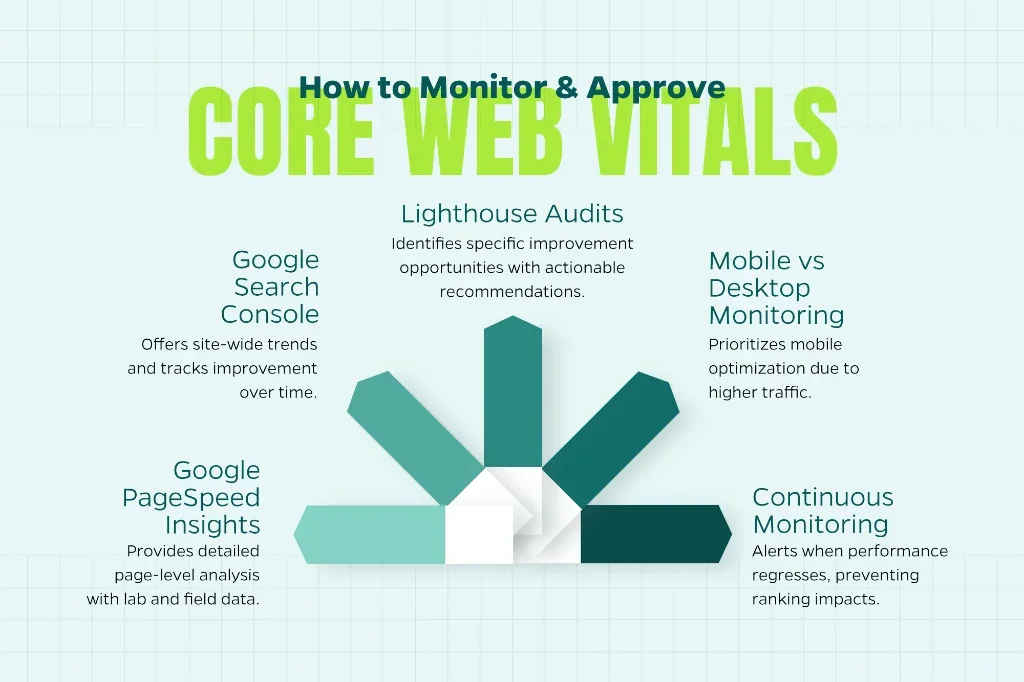
Improving Core Web Vitals isn’t a one-and-done task—it’s an ongoing effort. Google evaluates your site based on real user data at the 75th percentile, meaning 75% of your visitors need to have good experiences for your site to pass. Here’s how to monitor your performance:
- Use Google PageSpeed Insights for page-level analysis. This tool provides both lab data (simulated tests) and field data (real user measurements) when available.
- Check Google Search Console’s Core Web Vitals report for site-wide trends. This shows which page groups are passing or failing and tracks improvement over time.
- Run Lighthouse audits in Chrome DevTools to identify specific opportunities for improvement. Lighthouse provides actionable recommendations with estimated impact.
- Monitor mobile and desktop separately: Mobile scores are typically lower due to slower connections and less powerful devices. Since most traffic is mobile-first, prioritize mobile optimization.
- Set up continuous monitoring: Tools like Calibre, SpeedCurve, or Google’s web-vitals JavaScript library can alert you when performance regresses, helping you catch issues before they impact rankings.
Final Thoughts
Core Web Vitals aren’t just about pleasing Google. They give your visitors a smooth, frustration-free experience. A site that loads quickly, responds instantly, and stays visually stable builds trust, keeps users engaged, and ultimately drives more conversions.
Fortunately, you don’t need to be a developer to make progress. Start with simple fixes like image compression, lazy loading, and font preloading, then move into script optimization and layout stability. Step by step, you’ll not only improve your search visibility but also deliver the kind of digital experience today’s users expect.
As web performance standards continue to evolve, staying ahead of Core Web Vitals positions your business for long-term success in an increasingly competitive digital landscape. If you need expert guidance on optimizing your site’s performance, the team at Straight North can help you implement these strategies and achieve measurable results.
Ready to improve your Core Web Vitals? Contact Straight North today to learn how our SEO services can boost your site’s performance and search rankings.