
LinkedIn advertising works differently than most other paid channels. You’re reaching people while they’re in a professional headspace, thinking about their career and business challenges. That context is valuable, but only if your ads land in front of the right people. Otherwise, you’re just paying premium rates to be ignored by the wrong audience.
For B2B companies, LinkedIn’s targeting tools are the difference between an ad budget that generates qualified leads and one that quietly disappears. Here’s how to use them well.
Start with a Clear Picture of Your Buyer
Before opening Campaign Manager, define who you’re trying to reach. LinkedIn’s targeting options are only useful if you already know the job titles, industries, and company types that matter to your business. Vague targeting produces vague results, no matter how much you spend.
Here are a few questions worth answering before you build a campaign:
- What job titles or functions typically make or influence the purchase decision?
- What size and type of company gets the most value from what you offer?
- What industries or verticals have historically converted best for you?
If your sales team already has a working definition of an ideal customer, start there. LinkedIn targeting works best when it’s built on real data about who buys from you, not assumptions about who might.
Use Firmographic Targeting to Narrow the Field
LinkedIn’s biggest advantage over other platforms is its firmographic data, meaning details about the companies your audience works for rather than just their personal interests. This lets you filter by company size, industry, growth rate, and even revenue in some cases.
Company size matters more than marketers often assume. A campaign aimed at enterprise decision-makers will fall flat if it’s shown to small business owners with different budgets and buying processes, and the reverse is also true. Segmenting by company size — even if it means running two versions of a campaign instead of one — usually produces a stronger cost per lead than a single broad audience.
Industry targeting is worth layering in as well. This is especially true if your product or service solves a problem specific to certain sectors. A campaign for manufacturing software doesn’t need to reach retail or hospitality companies. So, it would make sense to exclude those industries to keep your budget focused.
Get Specific with Job Titles, Functions, and Seniority
Targeting by job title feels like the obvious move, but it can backfire if you’re too rigid. Titles vary widely between companies. A “Director of Marketing” at one company might hold the same responsibilities as a “VP of Marketing” or “Head of Marketing” at another. Relying on exact titles alone can shrink your audience more than you intend.
LinkedIn’s job function and seniority filters solve this problem. Instead of guessing every possible title, you can target by function (such as marketing, operations, or IT) and seniority level (such as director, VP, or C-suite) at the same time. This combination tends to capture more of your actual audience than title-only targeting while keeping the list relevant.
A practical approach is to layer function and seniority as your primary filter, then add specific job titles as a secondary check if your campaign needs tighter precision.
Don’t Overlook Skills, Groups, and Interests
Firmographic and title-based targeting help you define the core audience for a LinkedIn campaign. Skills, groups, and interests add another layer by showing what people know, follow, or engage with professionally. Using these signals alongside your primary targeting can reveal more specialized audiences that title-based filters alone might miss.
For example, targeting people with specific technical skills can be useful for software or IT services companies looking to reach practitioners rather than managers. Group membership can surface people who are engaged in a particular professional community, which often signals interest in the topic your ad addresses.
These filters work best as a supplement to firmographic and title targeting, not a replacement. Used alone, they can produce audiences that are interested but not positioned to buy.
Build and Retarget Your Own Audiences
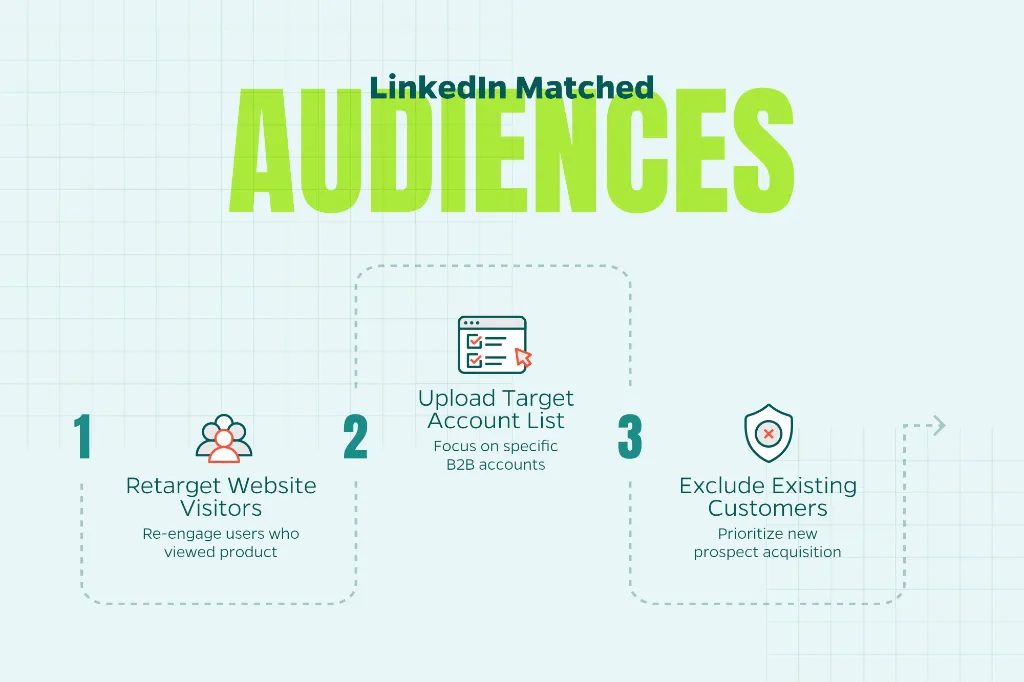
LinkedIn has a matched audiences feature that lets you upload your own contact lists, website visitor data, or account lists and use them for targeting or exclusion. This is one of the most underused tools in LinkedIn advertising, and one of the most effective.
Here are a few ways to put matched audiences to work:
- Retarget website visitors who viewed a product or service page but didn’t convert.
- Upload a target account list for account-based marketing campaigns.
- Exclude existing customers so ad spend goes toward new prospects instead.
Once a matched audience is uploaded, LinkedIn allows you to build a lookalike audience from it, expanding your reach to people with similar professional profiles. This is a solid way to grow beyond your existing contact list without losing the relevance that made the original list valuable.
Keep Your Audience Size in a Healthy Range
It’s tempting to stack every targeting filter available to get as specific as possible. But audiences that are too narrow can limit delivery and drive up costs. LinkedIn generally recommends keeping audiences above 50,000 people for most campaign objectives, though the right number depends on your budget and goals.
If your targeting produces a very small audience, consider loosening one filter rather than removing targeting altogether. The goal is a focused audience that’s still large enough for LinkedIn’s algorithm to optimize delivery effectively.
Test, Measure, and Refine
Even well-researched targeting benefits from testing. Running two or three audience variations against the same ad creative can reveal which segments respond best. Pay attention to cost per lead, click-through rate, and conversion rate by audience segment, not just overall campaign performance.
Over time, this data helps you build a clearer picture of which combinations of industry, seniority, and company size perform best. Consequently, you can start future campaigns from a stronger position instead of a blank slate.
Need Help?
Want help building a LinkedIn ad strategy that reaches the right audience? Contact Straight North to talk through your goals and get started.