


Key Takeaways:
- Broader local SEO insights: GBP metrics in GA4 reveal customer actions beyond website visits.
- Seven engagement metrics: Track calls, clicks, directions, bookings, messages, menus, and interactions.
- Reporting limitations: GA4 retains six months of GBP data and combines results across locations.
- Complementary reporting tools: Use GA4 for overall trends and GBP for location-specific insights.
- Better business decisions: Compare profile engagement with qualified leads and actual business results.
A customer finds your business on Google Maps, taps to call, or requests directions, and never visits your website. Those actions matter, but reporting focused only on website traffic can leave them out of the picture.
The Google Business Profile and Google Analytics 4 (GA4) integration helps close that reporting gap. By showing Google Business Profile metrics alongside website and app data, it gives marketers a broader view of how customers interact with a business.
For businesses and SEO teams, that means more context for evaluating local search performance. It also raises practical questions: How do you connect the accounts? Which metrics are available? And what can those metrics actually tell you about business results?
Straight North Local SEO & GEO Expert Josephine Schramm and SEO & GEO Analytics Expert Marc Holt walk through the setup, explain the key metrics and reporting limitations, and show how to incorporate these insights into your local SEO reporting.
What Is the Google Business Profile and GA4 Integration?
The integration brings Google Business Profile (GBP) performance data into GA4, allowing businesses to review website clicks, calls, and direction requests alongside website and app reporting.
Yeah, so it’s a native direct API that’ll bridge GA4’s product link suite that ingests core integrated data directly from GBP into a standardized dedicated reporting workspace inside GA4. It represents a major shift from Google, formally acknowledging that an organic search campaign’s performance extends beyond web sessions. For practitioners, it consolidates offline touchpoints, and on-site behavior under one roof, cutting manual reporting. And it’ll evaluate overhead work. So, it places off-site server interactions, such as phone calls, direction requests, directly alongside your website’s conversions and, user behavior… excuse me, user, data interactions. So it’ll allow all of your, data to be under one… one reference, one footprint.
Historically, those insights lived in separate platforms. GBP reported interactions with a local listing, while GA4 measured activity on a business’s website or app. Marketers used UTM-tagged links, spreadsheets, and separate reports to bring the information together. Even then, website reporting alone left out customers who called or requested directions directly from a profile.
Having these metrics in GA4 makes it easier to compare Google Business Profile activity with website performance. A local business can monitor changes in profile engagement alongside website performance, giving its team more context for evaluating local marketing efforts and deciding what to investigate next. These interactions provide useful signals of customer intent, though they do not establish completed sales or store visits.
Why Local SEO Reporting Needs More Than Website Traffic
Website traffic captures only part of how customers respond to a local business. Someone searching for a nearby service may call directly from Google, while a shopper may request directions and head to a store. Neither action requires a website visit, so reporting focused exclusively on sessions can overlook meaningful engagement.
Calls, Directions, and Bookings Reveal Customer Intent
Josephine points to calls and direction requests as signals that a searcher may be ready to take the next step. A person requesting directions could be planning a visit. Someone tapping the call button might want to ask about availability, discuss a service, or schedule an appointment.
Bookings provide another useful signal: a customer has moved from researching options to reserving a time. Reviewing these actions alongside website traffic helps businesses understand how customers choose to engage and which types of interactions are changing over time. Marc explains this further.

So, agencies can now track more than website visits by seeing calls, bookings, and other actions people take on Google Business Profile. This helps agencies show how local SEO brings in leads and helps businesses grow.
What Profile Interactions Can — and Cannot — Tell You About ROI
These metrics help show customer interest, but each has limits. A call-button click does not confirm that someone reached the business or became a qualified lead. A direction request does not verify a store visit. A booking does not guarantee that the customer attended, purchased, or generated revenue.
To evaluate ROI, businesses need to connect engagement with confirmed outcomes wherever possible. That may involve reviewing answered and qualified calls, completed appointments, customer records, or sales data.
Profile interactions give local SEO reports valuable context. They help teams identify trends and investigate opportunities; confirmed leads and revenue provide the evidence needed to assess financial results. Understanding what these interactions measure is the first step. The next is connecting your business profiles to GA4 to begin reviewing the data.
How to Connect Google Business Profile to GA4
Connecting GBP to GA4 starts in your Analytics property’s Admin settings. Before beginning, confirm that you have access to both the property and the business profiles you want to include.
Confirm Your GA4 and Business Profile Permissions
Before linking, confirm that you have an Editor or Administrator role for the GA4 property and Owner or Manager permissions for each business profile you intend to link. Sign in with a Google account that has the required access to both.
“You must have the editor or administrator permissions at the GA4 property level to establish external product links.”
Senior SEO & GEO Strategist | Local SEO & GEO Expert
Select and Link Your Business Profiles
In the appropriate GA4 property, navigate to Admin → Product links → Google Business Profile links. Click Link, follow the prompts to select the profiles you manage, and double-check that the intended locations are included. Review the data-sharing information and confirm the connection. Google allows multiple GBPs to connect to one GA4 property.
Verify the Connection and Find Your Reports
Verify that the connection is active in GA4’s Google Business Profile links settings. An active connection also displays a notification banner on your business profile performance page indicating that aggregated data is being shared.
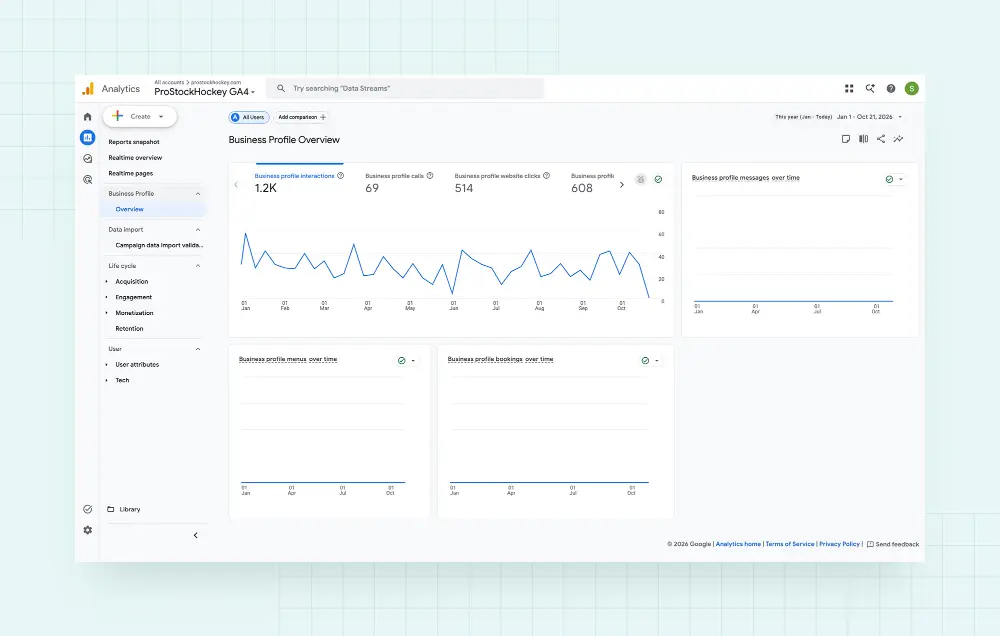
Find the reporting collection. Open Reports in GA4 and look for the dedicated GBP collection. Its cards summarize metrics from your linked profiles. If you connected multiple locations, the reports combine their results, so confirm your profile selection before interpreting the totals.
Which Google Business Profile Metrics Appear in GA4?
The integration brings seven GBP metrics into GA4: interactions, website clicks, calls, directions, messages, bookings, and menus. Results are combined across linked profiles, and GA4 displays metric cards even when a metric is irrelevant to the business.
Metric | What it measures | Measurement limit |
Interactions | A summary of profile engagements | Does not represent unique customers or sales |
Website clicks | Clicks on your profile’s website link | Does not confirm a recorded website session |
Calls | Clicks on the call button | Does not confirm an answered or qualified call |
Directions | Requests for directions to your business | Does not verify arrival |
Messages | Distinct messaging conversations (see note below)* | Does not establish lead quality |
Bookings | Completed bookings through a supported provider | Does not confirm attendance or revenue |
Menus | Menu-content clicks, counted per user, per day | Does not establish an order or purchase |
* Google discontinued Google Business Profile (GBP) chat/messaging on July 31, 2024. The Messages metric may still appear in GA4, but it will typically show zero because the feature is no longer available. Businesses can use SMS text messaging or WhatsApp as alternative communication options.
The overarching composite KPI is the total sum of all the user engagements, so it’ll be the calls, clicks, directions, messages, bookings, and menu interactions all summed up. The exact time users selected the primary website link in your profile card, initiating an off-platform transition from your specific landing page, excuse me, to your specific landing page. Bookings reflect appointments scheduled through integrated reserved Google partners, while menu interactions track clicks and structured menus and product catalogs.
Interactions and Website Clicks
Interactions provide a starting point for reviewing overall engagement. Website clicks help businesses assess whether their profile encourages further research online.
Review both alongside website engagement and key events. For example, rising profile activity with fewer website clicks could prompt a closer look at whether customers are choosing other ways to contact the business.
Calls and Direction Requests
Josephine highlights calls and direction requests as useful indicators of immediate interest. For a service business, calling may be the next step toward an appointment. For a storefront, requesting directions may signal a planned visit.
Compare these trends with actual customer activity to determine whether increased engagement is producing results.
Messages, Bookings, and Menu Interactions
These actions help explain how customers evaluate and approach a business. Bookings can inform appointment planning, while menu engagement can help restaurants understand interest in their offerings. Keep in mind that GA4 may display both Messages and Menu cards regardless of business type. However, Messages will typically show zero following the discontinuation of Google Business Profile messaging, while menu clicks are generally relevant only to certain businesses, such as restaurants.
Prioritize the metrics that match your business model and compare them with operational results before drawing conclusions about performance.
What Are the Limitations of Google Business Profile Reporting in GA4?
While these metrics provide a broader view of local engagement, the integration has several restrictions that affect how businesses can analyze and report on the data.
The Six-Month Reporting Window
GBP metrics in GA4 are available for the most recent six months. Selecting a longer date range does not extend that window, so the integration alone cannot support year-over-year comparisons.
For businesses with seasonal demand, this makes historical recordkeeping especially important. A decline after a busy summer may look concerning compared with the previous month but follow a normal pattern compared with the same period last year. Save performance data regularly to build that context.
Combined Reporting Across Multiple Locations
When several GBPs are linked to one GA4 property, their metrics are added together. You cannot segment or filter those metrics by individual profile within the integration.
Combined data can help businesses track overall engagement, but it won’t show how each location performs on its own. Growth at one busy storefront could offset declining activity elsewhere. As Josephine explains, teams still need to examine individual profiles to understand which locations require attention.
Restrictions on Explorations, Comparisons, and Filters
GBP metrics cannot be used in GA4 custom explorations or comparisons, and filters cannot be applied to them. The integration also does not support subproperties or allow businesses to select which metrics are shared. Linking GBP to GA4 automatically shares all available metrics.
Plan additional reporting tools around the questions your team needs to answer. If a report requires location-level analysis or custom combinations of data, confirm that your chosen data source and reporting platform support those requirements.
When Should You Use GA4 Versus the Business Profile Dashboard?
Because GA4 combines profile data and limits certain reporting capabilities, businesses still need the native Google Business Profile dashboard. Each platform serves a different purpose in evaluating local SEO performance.
Use GA4 for a Consolidated Engagement Overview
Use GA4 when reviewing local profile engagement alongside website and app performance. This is useful during monthly reporting, when teams need to discuss how customers are interacting across different touchpoints.
For single-location businesses, GA4 provides a simple way to view GBP engagement metrics alongside website performance. Multi-location businesses also benefit from an overall view, but need additional reporting to understand differences between individual locations.
For example, an increase in calls alongside steady website traffic may prompt a conversation about how customers prefer to contact the business. Treat those patterns as questions to investigate, then consult business records to understand the outcomes.
Use GBP for Individual Location and Discovery Insights
Return to GBP when you need to examine a particular location or understand how people discovered it. Its performance reporting includes search terms and profile views on Search and Maps, providing context for changes in engagement.
Josephine also recommends keeping profile management and reviews in the ongoing workflow. Customer feedback can reveal issues that reporting totals cannot, such as repeated questions about opening hours or difficulty finding a location.
How to Build These Insights Into Your Local SEO Reporting
The integration becomes more useful when teams make it part of a consistent reporting process. Marc Holt recommends incorporating the integration into onboarding, updating monthly reports, and training the people responsible for interpreting the results.
“Agencies should add Google Business Profile linking to onboarding, update monthly reports, and teach their teams how to use the new data.”
Enterprise SEO & GEO Strategist | SEO & GEO Analytics Expert
Add Account Linking to Client Onboarding
Make linking part of the initial local SEO setup. Confirm permissions, select the intended profiles, and verify the connection before incorporating results into client reporting.
Document the linked locations, setup date, and reporting responsibilities. This gives future team members a clear reference and helps explain changes when locations are added or removed.
Keep UTM Tags for Website Attribution
Continue using consistently tagged GBP website links to help identify incoming traffic and evaluate subsequent website activity.
Maintain a documented naming convention for locations and link placements. Test the links and confirm that the expected values appear in reporting. Remember that website attribution does not establish the outcome of calls or direction requests.
Save Historical Data for Year-Over-Year Comparisons
Regularly save your Google Business Profile performance data in a spreadsheet or reporting system so you can review it beyond GA4’s six-month reporting window. An archive supports seasonal analysis and year-over-year comparisons that the integration alone cannot provide.
Use consistent reporting periods, location identifiers, and metric names. Record significant changes such as new locations, revised hours, or a different booking provider, so future comparisons have context.
Review Engagement Trends in Monthly Reports
Prioritize the actions that matter to each business. An appointment-based service may focus on calls and bookings, while a restaurant may pay closer attention to directions and menu engagement.
Investigate meaningful changes before drawing conclusions. Consider seasonality, advertising, profile updates, location changes, and measurement issues. Wherever possible, compare engagement with qualified calls, completed appointments, and sales.
Each report should explain what changed, what evidence may explain it, and what the team will do next.
Use these findings to guide the next optimization steps. For example, changes in call activity may warrant a review of service information and contact options, while declining direction requests may prompt a check of location details, hours, and customer feedback. Treat these as investigation priorities rather than proof of causation.

Agencies should add Google Business Profile linking to onboarding, update monthly reports, and teach their teams how to use the new data. They can also track changes in customer actions to help plan future SEO work. The biggest benefit is seeing more customer actions in GA4, which helps agencies better measure local SEO results. However, GA4 only keeps six months of this data and can’t show results for each location, so agencies will still need other reporting tools.
Turn Local Engagement Into Better Business Decisions
The GBP and GA4 integration gives businesses more context for understanding how customers engage with their local presence. Its value comes from using that information to ask better questions and make informed decisions.
Build linking into onboarding, preserve historical records, and review relevant customer actions each month. Use individual profile data and business records to determine whether those interactions led to meaningful business outcomes. That process helps teams move from reporting activity to understanding which efforts contribute to business results.