
In today’s digital landscape, your website is the first impression potential customers have of your brand. At Straight North, we’ve seen firsthand how exceptional web design and user experience (UX) can transform casual visitors into loyal customers. With so many elements to consider, creating an effective website can feel overwhelming. That’s why we’ve developed this comprehensive checklist to guide you through the essentials of building a site that’s both visually compelling and intuitively functional.
1. Prioritize Responsive Design
Your website must deliver a consistent, high-quality experience across all devices from desktop computers to smartphones. Responsive design automatically adapts your layout based on screen size, ensuring seamless functionality regardless of the device visitors use to access your site. This isn’t just a nice-to-have feature. Mobile devices account for at least 60% of all web traffic. So, a non-responsive site leads to frustrating experiences and lost opportunities to competitors.
Test your site regularly across multiple devices, or leverage tools like Google’s Mobile-Friendly Test to identify and address issues before they impact your audience.
2. Simplify Navigation
Clear, intuitive navigation serves as the roadmap for your website. Just as a well-organized physical store makes shopping easier, a logical site structure helps users find information quickly and effortlessly. Design your menu with straightforward categories. Include a search function if your site contains extensive content.
Best practice suggests that users should be able to reach any key page within three clicks. Avoid complex dropdown menus or hidden navigation elements that create confusion. When users can find what they need immediately, they’re more likely to engage with your content and make a purchase.
3. Optimize for Speed
Page load speed directly impacts user retention and satisfaction. Research consistently shows that slow-loading pages lead to high bounce rates. An effective site should load in three seconds or less. You can achieve this by compressing images, streamlining code, and investing in reliable hosting infrastructure.
Tools like Google PageSpeed Insights provide actionable recommendations for improving performance. Beyond enhancing user experience, faster sites also rank better in search engine results, creating a compound benefit for your digital presence.
4. Focus on Accessibility
Make sure your site serves all users, including those with disabilities. Accessibility features are essential components that expand your audience while often fulfilling legal requirements.
Key accessibility practices include:
- Adding descriptive alt text for images
- Providing captions and transcripts for video content
- Ensuring sufficient color contrast for text readability
- Supporting keyboard navigation for users who cannot use a mouse
- Following WCAG (Web Content Accessibility Guidelines) standards
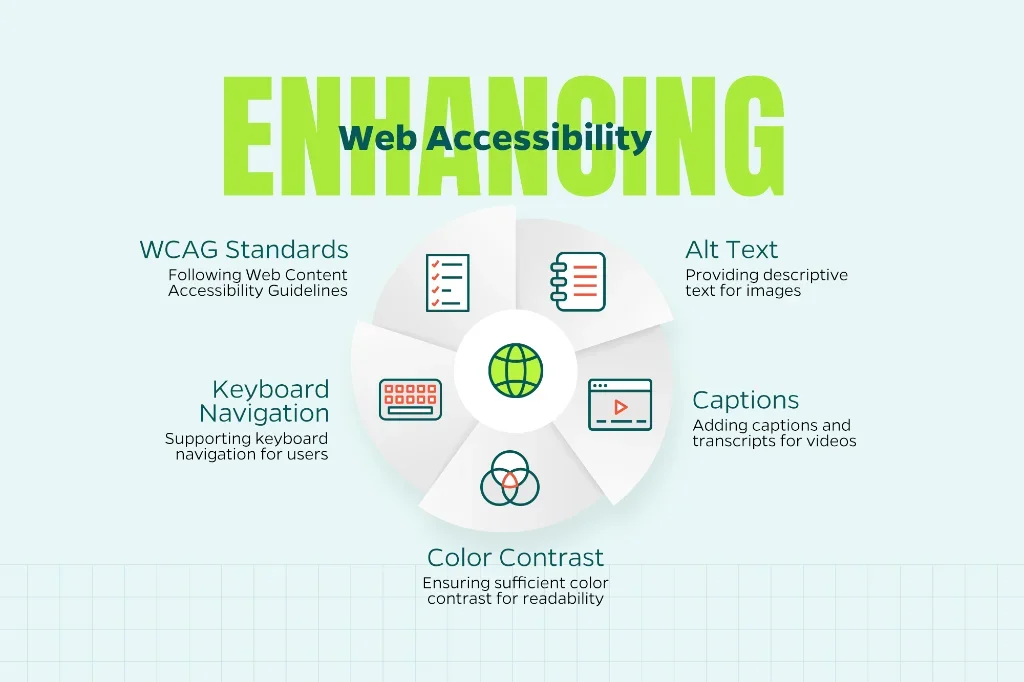
Accessible design benefits everyone by creating a more usable, inclusive digital experience.
5. Establish Visual Hierarchy
Effective visual hierarchy guides users’ attention to the most important elements on each page. Strategically use size, color, spacing, and contrast. This helps visitors quickly understand your message and navigate your content without feeling overwhelmed.
Consider placing your primary call-to-action above the fold—the visible area before scrolling. This captures the reader’s attention immediately. Make headlines prominent, use whitespace strategically, and ensure that key information stands out. When implemented well, visual hierarchy creates a natural flow that improves user experience.
6. Ensure Content Readability
Outstanding design means nothing if visitors struggle to read your content. Enhance readability by selecting clean, professional fonts and providing ample whitespace around text. Break longer content into digestible sections using headings, subheadings, bullet points, and supporting images.
Write at an accessible reading level—generally eighth grade or below—to ensure your message reaches the widest possible audience. For mobile users, larger font sizes and generous line spacing make a significant difference in comfort and comprehension.
7. Craft Compelling Calls to Action
Every page should feature effective UX writing that guides users toward a specific next step. That could mean subscribing to a newsletter, scheduling a consultation, or making a purchase. Effective CTAs use action-oriented language like “Get Started Today” or “Schedule Your Free Consultation.” Specificity is preferable to generic phrases like “Click Here.”
Strategic placement matters as much as the wording. Use contrasting colors to make CTAs visually prominent, and test different variations to determine what resonates most with your audience. At Straight North, we regularly conduct A/B testing to optimize CTAs and maximize conversion rates.
8. Incorporate User Feedback and Testing
Continuous improvement requires real user insights. Analytics tools such as heatmaps and session recordings reveal how visitors interact with your site. These tools often highlight issues that aren’t apparent from a design perspective. You can also receive invaluable feedback from user surveys and usability testing with real people.
This iterative approach—designing, testing, and refining based on actual behavior—ensures your UX evolves to meet user needs. Regular testing leads to better engagement, higher satisfaction, and improved conversion rates over time.
9. Integrate SEO Best Practices
Web design and search engine optimization are deeply interconnected. When you build a website, you should incorporate SEO elements including properly structured meta tags, logical header hierarchies (H1, H2, H3, etc.), and mobile optimization. Clean URL structures, fast load times, and high-quality content all contribute to better search visibility, too.
By employing strong SEO practices, you ensure that your well-designed site reaches your target audience. If you find search optimization to be complex, you can partner with experienced professionals to significantly accelerate your results and help you avoid common pitfalls.
10. Secure Your Site
Security builds trust—a fundamental component of a positive user experience. If visitors don’t trust you, they won’t do business with you. So, they need assurance that their personal information and data are protected. Consequently, you should cover all your security bases, including:
- Implement HTTPS encryption across your entire site
- Display relevant security badges
- Maintain up-to-date software to prevent vulnerabilities
- Monitor your site for malware and suspicious activity through regular security scans and firewalls
- Use strong authentication protocols (e.g., two-factor authentication) for both users and admin access

A secure website protects both your visitors, as well as your business reputation, while positively influencing search engine rankings. With cyber threats becoming increasingly sophisticated, robust security measures are non-negotiable for any professional online presence.
Moving Forward
Implementing these ten essential practices will strengthen your web design and user experience. By following this checklist, you can create a site that attracts visitors, builds trust, and drives measurable results. While these principles apply broadly, every business has unique needs and goals that deserve customized solutions.
At Straight North, we bring extensive experience in digital marketing and custom web design that delivers tangible results. If you’re ready to elevate your website’s performance, we invite you to contact us for a complimentary consultation. We’d welcome the opportunity to discuss your project and explore how we can help you achieve your digital marketing objectives.