


Key Takeaways:
- You don’t need coding experience to automate SEO tasks.
- Start with repetitive, low-risk work like data collection and cleanup.
- Combine SEO data sources for more efficient analysis.
- Use guardrails and human QA before scaling automation.
- Automate processes you already understand rather than relying on AI to define the strategy.
As an SEO expert, you’re constantly adding to your skill set. Between analyzing performance, finding new opportunities and getting actionable data in front of your marketing team, there’s always another tool or technique that could make your job more efficient. But becoming a web developer probably isn’t next on your to-do list.
Fortunately, you don’t need to be one to take advantage of tools like Codex and Claude Code.
Despite having “code” right in their names, these AI coding agents aren’t just for developers. They can act as capable assistants that automate many of the repetitive, time-consuming tasks already built into your SEO workflow. That could mean pulling data from Google Search Console, cleaning up hundreds of URLs in a spreadsheet or tagging pages based on a defined set of rules.
The goal isn’t to turn yourself into a full-stack developer overnight. It’s to extend the SEO expertise you already have. You provide the strategy, judgment and rules; Codex or Claude Code handles more of the tedious work.
In this blog, I talk with Straight North SEO & GEO Automation Expert Nick Fatigato to learn how SEO professionals can use coding agents to automate data retrieval and data entry, where automation can save the most time, and what guardrails you should put in place before letting AI get to work.
Which SEO Tasks Are Safest to Automate?
Think about a recurring report you compile every Monday morning. You log into the same platforms, export the same data, clean up the formatting and categorize the results before sending the report to your team. The process may be necessary, but does every step require your SEO expertise?
Probably not. And that’s exactly the type of work that’s a good candidate for automation.
So the safest SEO tasks to automate are the ones that are repetitive, rules-based, reversible, and easy to validate. So something that you do all the time, something that any, you know, anyone within a process does over and over again, but could save a lot of time if it were automated.
Some examples include:
- Collecting Google Search Console (GSC) data
- Combining Google Analytics 4 (GA4) and crawl exports
- Cleaning URL lists
- Classifying pages
- Identifying missing elements, such as title tags
The dividing line is judgment. Tasks that require strategic decisions or make changes directly to a live website need much more human oversight. A general guideline is simple: automate the grunt work, not the judgment.
Where should you start? For many SEO teams, one of the easiest opportunities is a task they already perform regularly: pulling data from GSC.
Automating Google Search Console Data Retrieval
Google Search Console is a natural place to begin experimenting with SEO automation. If your team relies on the same GSC reports week after week, you already have a repeatable process that a coding agent can take on.
In more practical terms, the cleanest way to use Google Search Council API to pull in that data to a spreadsheet, you would be able to define the site, the date range, dimensions, whatever you want, all the filters that you have within Google Search Console. And then you can use that API to integrate within the Claude or Codex to make that script export the data, and then turn that into a Google Sheet, turn that into an Excel. Don’t try to automate your entire reporting ecosystem in one day. Start with one report that you’re tired of manually reporting, and then you can move on to bigger and broader endeavors after that.
You don’t need to begin with anything complicated. Consider a report your team already uses, such as page-level performance for a particular section of your website. If you’re pulling that report on the same schedule and following the same steps each time, you have an opportunity to hand off the repetitive part of the process while keeping the analysis in your hands.
Start small, verify the output and expand only after the workflow proves reliable.
From there, you can move beyond a single data source. Bringing GSC together with analytics and crawl data gives you a more complete picture of how your pages are performing.
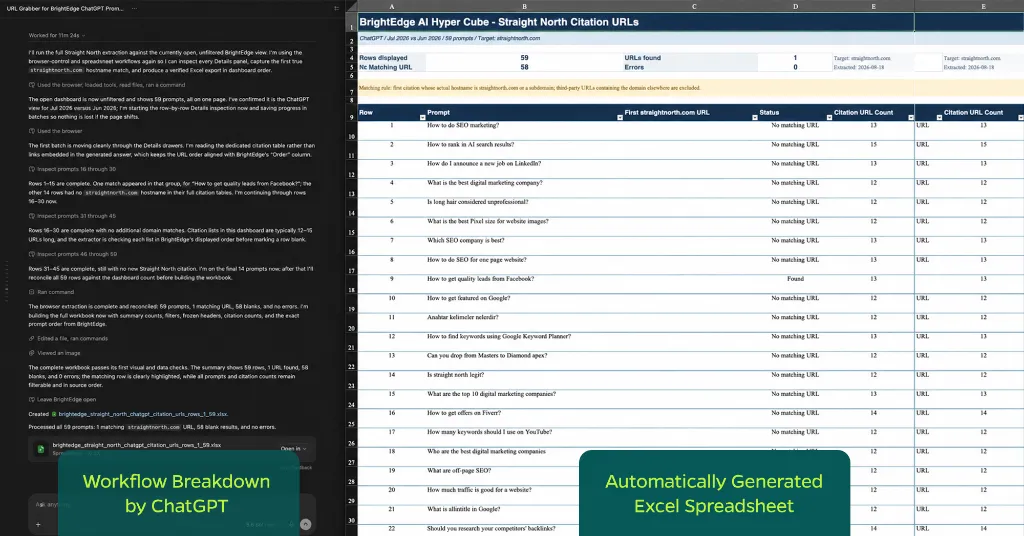
Combining GSC, GA4, and Crawl Data
Looking at GSC data alone can tell you a lot about search performance, but it doesn’t tell the whole story. SEO analysis often requires pulling information from several sources to understand both how a page is performing and what could be contributing to those results.
Each source gives you a different piece of the puzzle:
- GSC: Shows how your pages perform in search.
- GA4: Shows what visitors do after they land on your website.
- Crawl data: Provides technical information about your pages, including status codes, title tags, meta descriptions, canonicals, crawlability and indexability.
The challenge is getting those different sources to work together. That’s where Codex or Claude Code can help.
“The key to creating a shared joining point between sources of data, especially for SEO, is usually the URL. Once the URLs match up, then you can merge the data into one more working file.”
Enterprise SEO & GEO Strategist | SEO & GEO Automation Expert
Instead of jumping between separate spreadsheets to compare search performance, user behavior and technical issues, you can bring that information together into one working dataset. That makes it easier to spot relationships in the data and gives you a more complete view of what’s happening across a group of pages.
Fatigato compares the three data sources to coworkers describing the same meeting from different rooms: Each one has useful information, but you get a much clearer picture once everyone is in the same room.
Automation gets the information into the same place. Your SEO expertise is what turns that combined data into insights and determines what to do next.
Automating Meta Titles and Descriptions
Writing title tags and meta descriptions is another time-consuming SEO task, especially when you’re working across hundreds or even thousands of pages. Codex or Claude Code can give you a significant head start, but metadata also introduces more risk than simply collecting data from GSC.
The important distinction is between automating recommendations and automating live updates. Having an agent help create metadata is one thing. Giving it permission to publish those changes across your website without review is another.
A safer approach is to use automation to get you to the first draft.
There’s a big difference between automating recommendations and then actually automating the live updates, so I want to make that distinction. But I would say, very comfortable using automation to create a first draft of title tags and descriptions within a spreadsheet. You can essentially export all of your URLs, all of your live HTML pages that you already want to be indexed or are indexed, and then within that list, you could go a little step further within a spreadsheet, give a little note, or actually provide the existing title tag description for those already, so the AI has more to work with. But whatever you give the AI, it’s only gonna be as good as what you give it.
From there, your SEO expertise comes back into the process. Review the recommendations for accuracy, search intent, relevance, and fit with the page before anything goes live. You can also establish formatting requirements and other parameters the output must meet before it reaches that stage.
The goal isn’t to remove people from the process. It’s to eliminate the tedious work of starting every title tag and description from scratch. Think of it as automating the assembly line while keeping human quality control in place.
How to Prevent Automation From Entering Bad SEO Data
The more access you give an AI coding agent, the more important it becomes to establish guardrails. Before an automation runs, clearly define what it can and can’t do with your data.
For spreadsheets, those safeguards might include:
- Required fields
- Allowed values
- Character limits
- URL validation
- Duplicate checks
- Formulas that flag suspicious outputs
You’ll want even stronger controls when an automation can make changes within a CMS. Consider limiting the agent’s permissions and restricting changes to a staging environment so mistakes don’t immediately affect your live website.
And before you turn an automation loose on a large dataset, test it on a small sample. Running a process on 10 rows gives you an opportunity to catch a problem before that same problem is repeated across 10,000.
It’s also helpful to distinguish between read and write workflows. Asking an agent to collect or analyze existing data is relatively low risk because it isn’t changing the source. Once the agent can write data back to a spreadsheet, CMS or another system, additional validation and quality assurance become much more important.
These guardrails set the boundaries for the automation. The next step is making sure the workflow stays within them.
Build QA Checkpoints Before Automation Goes Live
Setting rules for your automation is only part of the equation. Before allowing Codex or Claude Code to make changes to your data, you also need a process for checking its work and recovering if something goes wrong.
Build these QA checkpoints into your workflow:
- Run a dry test. Have the automation produce the intended output without actually updating anything.
- Review a small sample manually. Confirm that the automation is following your instructions and producing the expected results.
- Back up the original data. Keep a copy of your starting point before allowing any changes.
- Define which fields can be modified. Be explicit about where the agent can write data and what it should leave untouched.
- Establish a rollback plan. Make sure you can reverse changes if something doesn’t work as expected.
- Log every change. Record what changed, when it changed and where the information came from so you can quickly trace problems.
- Add human approval when necessary. For client-facing work, technical accuracy isn’t the only consideration. Recommendations may also need to meet your client’s strategy, tone and brand guidelines.
Don’t assume the coding agent will automatically build these QA steps into the workflow. Tell Codex or Claude Code which checks, approvals and limitations it must follow.

All of the AI platforms, when you’re looking for answers, they’re only as good as the answers that are available to them on the internet. That’s where they’re getting this information. So, when you’re hoping it can perform a task for you, the best thing you can do is provide as much information as possible, and set up as many rules, guidelines, guardrails as you can. And for client-facing work, I would add even one more layer, approval, even if the automation is technically correct. The recommendation still needs to be strategically appropriate. So, that comes from you as a strategist or as someone working on a website, but that also would come from a potential client or someone you’re working with as well. Perhaps certain automation’s outputs don’t match tone or brand guidelines. It might look good after QA, but there’s also additional steps that could be considered, depending on who you’re working with, or what kind of website, what kind of industry you’re working with. So, my preferred mindset is automation should earn trust gradually. It should not be given the keys to the building on its first day.
Consistent results can justify broader permissions, but access should expand in measured steps rather than all at once.
Be Specific About What Your Coding Agent Can Change
Even with QA checkpoints in place, your instructions matter. Codex or Claude Code shouldn’t have to guess which data it can read, where new information belongs or what it’s allowed to change.
Here, the safeguard is precision in the prompt. Spell out the boundaries of the task so the agent knows exactly what it can read, change and return.
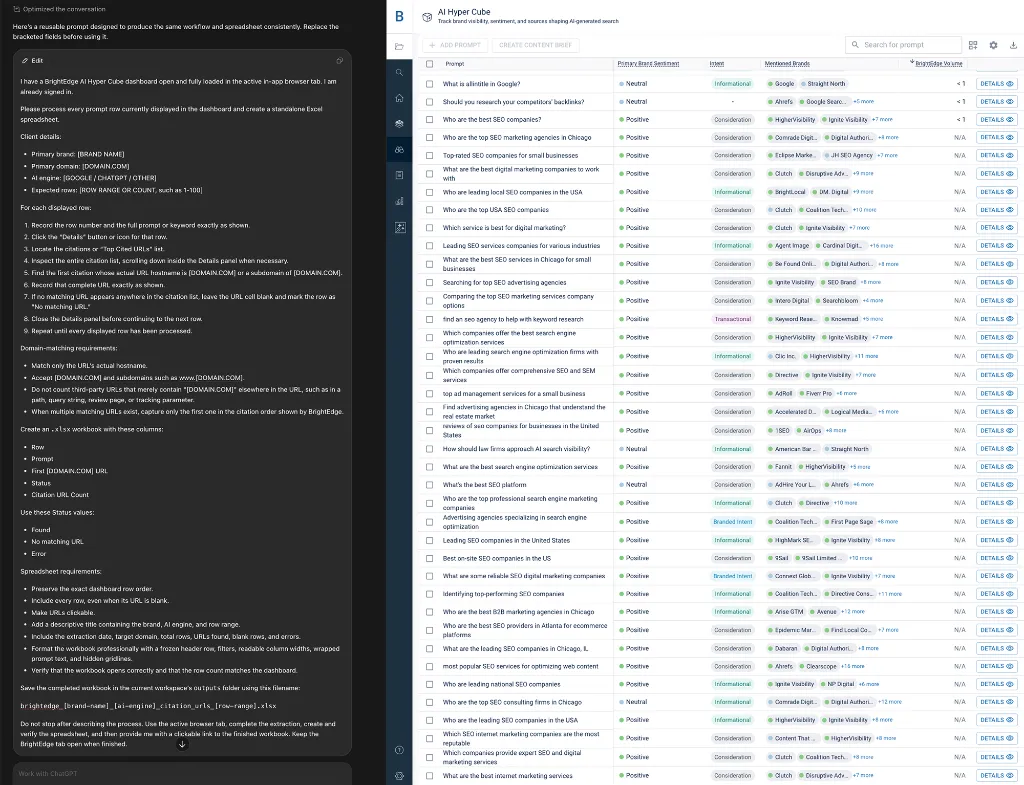
For example, instead of telling your coding agent:
“Update this spreadsheet.”
Give it explicit instructions such as:
“Update column D in Sheet 2 only when column A matches an approved URL.”
That distinction tells the agent what it should read, where it can write and under what conditions it should take action. You can apply the same approach throughout the workflow, identifying columns the agent should never modify and specifying exactly where different types of data belong.
I would say, yeah, test things out, be very clear, some… maybe a good way to put it, simplest way to say it, is don’t ask an AI agent to update the spreadsheet. Ask it to update column D in sheet 2 only when column A matches an approved URL. Something like that. Specificity is key, and safety to your business.
Don’t worry about making your instructions too detailed. Giving the agent more information about the process, its boundaries and the expected output helps eliminate ambiguity.
The more specific the instructions, the less room you leave for the agent to make the wrong decision.
Choosing Your First SEO Automation
Your first automation does not need to be the most advanced or impressive. Look for a task your team performs frequently that consumes time without requiring much strategic judgment.
Recurring Google Search Console reporting is one strong example, but the criteria matter more than the specific tool.
Once that is working, the next step is to combine GSC data with other sources, like GA4 and crawl data, so you can move from what changed to what might have happened, or why it might have happened. So, short answer, start with a report you export the most common, and complain about the most commonly. Anything that’s taking up a lot of your time, or making you complain because of how tedious it is, that would probably be a good place to start.
A strong first automation usually has four qualities:
- Repeatable: The task follows the same steps on a regular schedule.
- High-value: Completing it consistently supports useful SEO analysis or reporting.
- Time-consuming when done manually: Repetitive clicks, exports or cleanup add unnecessary work.
- Relatively low-risk: A mistake is easy to catch or reverse and does not immediately change the live website.
Once that first workflow is reliable, use what you learned to automate more complex tasks.
One practical test is to think about the repetitive report or task your team complains about doing the most.
If it is tedious, predictable and based on a process you already understand, you have probably found a strong candidate.
The Biggest AI Automation Mistake
Automation can make a good SEO process faster and more efficient. It can also scale the mistakes and inconsistencies in a bad process.
Before handing a workflow over to Codex or Claude Code, make sure you can clearly define:
- The goal: What are you trying to accomplish?
- The data source: Where should the agent get its information?
- The desired output: What should the finished result look like?
- The rules: What instructions should the agent follow?
- The exceptions: When should the standard process not apply?
- The review process: How will you validate that the automation worked correctly?
If you can’t answer those questions yourself, the workflow probably isn’t ready to be automated.
AI can make mistakes, these models change almost weekly at this point, so a change in the model can end up having an unexpected error on the output of things you’ve already set up. So the best automation starts with a clear human process, then the coding agent helps make that process faster, cleaner, more repeatable. AI is not a strategy microwave. You can’t throw a messy workflow into it and expect a five-star meal. You need the recipe first.
Validation shouldn’t end just because an automation worked correctly once. Continue checking the output as you use and scale the workflow; one successful test does not guarantee every future run will produce the same result.
The best automation starts with a process you already understand. Codex or Claude Code can then help make that process faster, cleaner and more repeatable.
“AI is not a strategy microwave. You can’t throw a messy workflow into it and expect a five-star meal. You need the recipe first.”
Enterprise SEO & GEO Strategist | SEO & GEO Automation Expert
As Fatigato puts it, you need the recipe first. AI can help execute a clear process more efficiently, but it should not be responsible for inventing the process itself.
Put AI to Work Without Giving Up Control
You do not need to become a developer to get value from Codex or Claude Code. Your SEO expertise is what defines the process, sets the rules and determines whether the output makes sense.
The coding agent handles the repetitive work in between.
The process is simple: You define the strategy and rules. AI performs the repetitive tasks. You validate the output. Then, once the process has proven reliable, you gradually scale the automation.
Start with one well-understood task, give the agent clear instructions and expand only after the results are consistent.
The goal is not to hand your SEO strategy over to AI. It is to spend less time on repetitive work so you have more time for the analysis, decisions and strategy that require your expertise.